Teaching Grammar in High School

Have you ever tried marking essays with really bad grammar, syntax and non-existent punctuation? No? Right, you’re not an English teacher. For those of you who are, or at any point have to labour through the ordeal of marking any kind of writing that is painful to look at, let alone grade, you will (I am certain) agree with me when I say that grammar, nay, good grammar, is an essential ingredient to good writing. So what do you do when you have a class full of high school students who do not, I repeat, DO NOT know their grammar? Well, you teach them of course! (I mean the clue is in your title! ;))

Teaching grammar in high school is tedious, boring, daunting and let’s face it, just plain scary, but you gotta do whatchu gotta do, right? (Yes, I cringed as I typed out that line in slang). So, how do you make it fun? You use Kahoot! End of story.

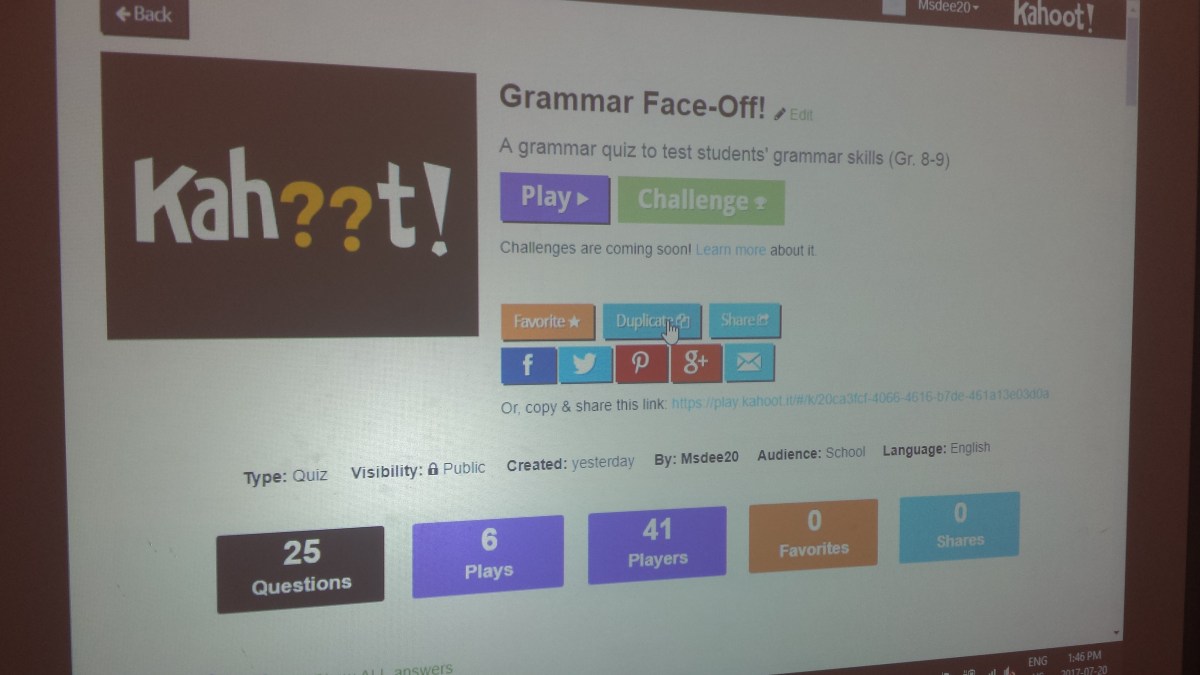
Here is a link to a Kahoot! presentation I created with 25 questions that cover punctuation, grammar and sentence structure: Grammar Face-Off Kahoot! Game

This Kahoot! can work as a diagnostic at the beginning of your course to determine where students are in their grammar, or as a review class where they play the game and you stop after each question to review concepts or teach them (because many of them will have never heard of a gerund or an infinitive phrase. Really? We have those in the English language?). You can choose to play this game individually with each student answering on his/her own mobile device, or do as I did where I grouped them into teams and made them play against each other. I found this to be a more fun approach because they were competitive and participated really well!

The game itself took about 35 minutes to get through and I rounded off my class with a prepared grammar package for each student that I found online. You can use any grammar worksheets and put them into a package depending on the writing abilities of your students.

So there you are, a simple lesson to help make learning grammar fun for your students. And the best part is, you can create an ongoing competition with Grammar Face-Offs once every week. Teams can accumulate points for a final big reward of your choice at the end of the school year (I would include GRAMMAR CHAMP certificates as part of their reward ;)). By taking the time to teach your students proper grammar, you not only invest in their quality of writing, you help groom them into becoming more effective communicators (a necessary life-skill). So there! You are doing your job and making a difference in the world. Well done, you!

©booksnnooks.org All Rights Reserved

Kahoot! – A FANTASTIC Teaching Tool!


Now and then I come across a fantastic teaching tool that not only works wonders for delivering my teaching material, but also resonates well with my students. Enter Kahoot! A truly phenomenal teaching tool that is both user-friendly and fun. Kahoot! offers a way to create interactive games for your class where you can conduct a survey (collect data), do an exam or test review or just test your students (for Summative review).

Here’s how Kahoot! works (I will write about the options I chose, and there are many!):

*Fellow teachers who are visual and auditory learners, don’t fret! Here’s a link to a youtube tutorial (NOT mine) that shows you how to use Kahoot! Kahoot Tutorial

  1. Create a teacher account at https://getkahoot.com/
  2. Create a game (choose from 4 options according to the needs of your subject – QUIZ, JUMBLE, DISCUSSION or SURVEY). I chose QUIZ.
  3. Type in the title for your quiz. As you can see from the screenshot above, I chose “Is This a Family?” for my Grade 12 University Family Studies Class where we explored and discussed students’ perceptions around the structure of a family.
  4. Type in a description of the quiz right below the title.
  5. Choose for your quiz to be available to EVERYONE so that your students can seamlessly log in later (I shall get to that shortly).
  6. Credit any sources and add a cover image or video as you see fit.
  7. From the drop-down menu choose SCHOOL as your audience.
  8. Click the OK, GO green button on the top right-hand side of your screen.
  9. When on the next page you can click the “+” sign and populate your quiz with as many questions as you would like.
  10. For each question, choose the time limit (how long that question will remain on screen while your students submit their answers).
  11. You may choose to award points or not.
  12. Put in the necessary answers. At least 2 are required. If it is a TRUE or FALSE question, you can leave the 3rd and 4th answer options blank. If it is a MULTIPLE CHOICE question, populate all fields. I used “YES” and “NO” as my options because my students only had to decide whether the scenario was representative of a family or not.
  13. Credit any sources for each question and click NEXT (green button on top right-hand corner).
  14. Add as many questions as you like.
  15. When you are satisfied with your questions, click SAVE.
  16. You will see a message that says “Saved and Published!”
  17. You can then choose to PREVIEW, SHARE, PLAY or EDIT your quiz.

When you are ready to PLAY with your class:

  1. Simply log in with your information.
  2. Click MY KAHOOTS from the black tab on the top of the screen, towards the left.
  3. Choose the Kahoot you want to play and click PLAY.
  4. Once your Kahoot is loaded, click the CLASSIC option which will allow all your students to participate on their mobile devices. Students simply have to download the app and you can get them to do this while you set up.
  5. Your next screen will have a PIN# which your students will put into their phones when prompted (*Note, the PIN# will change each time you play the Kahoot). After inputting the PIN#, each student will have to create a nickname and once they do, they will show up on your screen as having entered the game. Once all your students have entered (it shows the total number of players on the screen as they enter, and you can keep track based on how many students are in your class), you can click START and begin your quiz!

If you aren’t already convinced about the GREAT APPLICATIONS of this teaching tool, let me elaborate:

  1. This is a FANTASTIC way to begin conversations about bigger concepts that you want to share with your students.
  2. It allows for interaction in real-time and helps you as the teacher provide immediate feedback.
  3. Students can think on their feet and comment on peers’ responses beginning a rich and deep dialogue that can add to their bank of ideas.
  4. Kahoot! can be used for virtually ANY subject area at the Intermediate and Senior levels, and I specify Intermediate and Senior because it is this age group that usually has their own mobile devices. Want to review for a Math test? Go to Kahoot! Want to conduct a survey on student’s perceptions of the legal system for a Law course? Go to Kahoot! Maybe you want to just do a 2 Truths and a Lie Icebreaker for the first class. Go to Kahoot! This teaching tool affords you so much flexibility, where you go with it is really dependent on how creative you want to be.
  5. There are a lot of Public Kahoots too that are free to use if you are looking for inspiration or just something quick and easy to use for class.
  6. And the BEST THING about this? It allows students to use their mobile phones in the classroom, thus incorporating technology in a responsible and effective way. Plus, they’ll just love you for it!

If you do use Kahoot!, drop a comment below and share  your experience! Happy Kahooting!

©booksnnooks.org All Rights Reserved